

It is no secret that the Amazon Firestick has been the go-to device for years. However, recent changes have brought about significant shifts that make it challenging for us to continue recommending Amazon devices. With the rollout of Vega OS and new blocking mechanisms, the era of easy sideloading on the Firestick is drawing to a close.
If you are getting the App installation blocked message or your new device does not support Android apps at all, it is time to review some better options. We have put together this guide to help you find the best alternatives that still give you the freedom to install whatever you want.
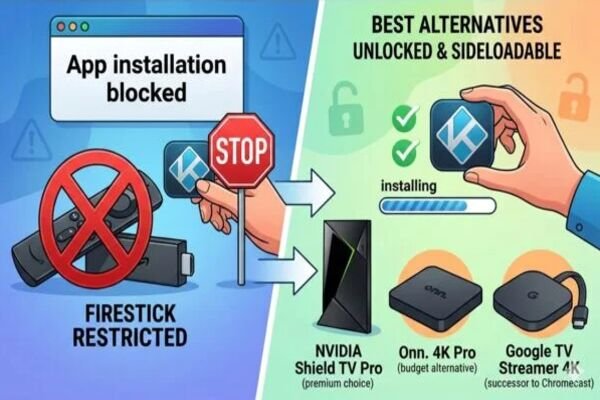
Why the Firestick is no longer our top pick
Amazon began to move away from the Android-based system in late 2025. Their new software, called Vega OS, is not compatible with Android apps. This means that APK files will not work on new devices, like the Fire TV Stick 4K Select.
Even on older Firesticks that still run Android, Amazon now blocks users from installing third-party apps it has flagged. If you want a simpler experience without these platform limitations, switching to a dedicated Android TV or Google TV device is the best move.
The best Firestick alternatives
NVIDIA Shield TV Pro
If you want the best possible experience, this is your obvious choice because it remains the most powerful and versatile streaming box available today. It runs a clean version of Android TV that is fully unlocked, providing a stable platform for high-performance streaming without the background processes or advertisements that often clutter cheaper devices.
- Pros: Supports 4K HDR10, Dolby Vision, and features advanced AI upscaling. It handles high-bitrate media and demanding skins with high efficiency.
- Cons: It is a premium device with a high price point. The absence of a dedicated AV1 hardware decoder is a notable limitation as the industry shifts toward this codec for superior 4K streaming quality.
- Sideloading: Completely open. You can use the Downloader app or a USB drive to install any app you like.
Onn 4K Pro
For users who prioritized the Firestick for its affordability, the Onn 4K Pro from Walmart is a strong budget-tier alternative. While it serves as a highly capable low-end device, keep in mind that its hardware is significantly weaker than the NVIDIA Shield and may struggle with the most demanding media builds or heavy skins.
- Pros: It costs a fraction of the Shield but performs remarkably well. It even comes with a Free TV button and a built-in Google Assistant.
- Cons: The built-in Ethernet port is limited to 10/100 Mbps, which is slower than the Gigabit speeds found on premium boxes. You may also experience occasional UI stutter during heavy navigation.
- Sideloading: It uses standard Google TV, so there are no hidden blocks or restrictions on third-party apps.
Google TV Streamer 4K
This is the successor to the old Chromecast Ultra. It is a sleek set-top box offering a faster interface and improved hardware than a standard stick. It represents a significant upgrade in the Google ecosystem, moving from a dongle design to a dedicated media hub with a faster processor and 4GB of RAM. This expanded memory ensures a more fluid navigation experience while enabling the device to manage complex applications and smart home background tasks without performance degradation.
- Pros: Integrated smart home features and a very smooth Google TV interface. It comes with 32GB of storage, offering ample capacity for all your preferred add-ons.
- Cons: It lacks Wi-Fi 6 support, which is a surprising omission at this price point. It also lacks the hands-free microphone found on the cheaper Onn 4K Pro.
- Sideloading: Very easy. You only need to enable Developer Options in the settings, and you are good to go.
Chromecast with Google TV 4K
For those who prefer a compact stick-style device that remains hidden behind the TV, this is the most reliable alternative. While it provides a consistent Google TV experience, it is a more modest device compared to the Google TV Streamer. It offers less processing power and more restricted internal storage and RAM, making it better suited for minimalist setups. Still, it remains a highly efficient choice for users who want a simple, unobtrusive way to stream high-quality content.
- Pros: It is small, affordable, and receives regular updates directly from Google.
- Cons: Its 8GB of internal storage is extremely limited, often leading to storage warnings if you install more than a few large apps. The processor is aging and may feel sluggish with modern, heavy builds.
- Sideloading: Just like the other Google devices, it is a simple process to get your apps running in minutes.
What to do with your old Firestick?
Upgrading to a more open device, such as Onn or Shield, does not mean your existing Firestick hardware is now obsolete. Even if Amazon’s new restrictions make it a secondary device for your main setup, it can still be incredibly useful in other parts of your home.
- The ultimate travel companion: This is arguably the most effective way to reuse an older device. By keeping your Firestick in your travel luggage, you can bypass the restricted interfaces of hotel televisions. Since your accounts and preferences are already configured, it provides a seamless experience without the security risks of entering credentials on public hardware.
- Secondary guest room integration: Repurposing the device for a guest room provides visitors with a familiar and intuitive interface for accessing standard applications such as YouTube and Netflix. This ensures the best experience for your guests without requiring them to navigate your primary media configuration.
- A dedicated retro gaming console: Even older Firestick models are powerful enough to run emulators for classic consoles like the NES or Sega Genesis. Moreover, by connecting a Bluetooth controller, you can transform the hardware into a discreet and compact gaming station.
- Digital audio integration: An older Firestick can effectively modernize legacy audio equipment. You can connect the device to an AV receiver or powered speakers, utilizing it as a dedicated terminal for streaming services such as Spotify or Amazon Music. Furthermore, this is an efficient way to provide high-quality audio in a home office or workshop without requiring additional hardware.
- Dedicated child-safe environment: Utilizing the integrated Amazon parental controls allows you to restrict access to specific applications, such as PBS Kids or Disney+. This creates a secure, dedicated viewing area for children while ensuring your primary streaming hardware remains protected from accidental configuration changes.
Final thoughts
We believe that your hardware should not dictate which applications you are permitted to install. While the Firestick has been a reliable tool for the streaming community for years, the transition to Vega OS marks a fundamental shift toward a closed ecosystem.
Consequently, by moving to a Google TV or Android TV device, you ensure that you remain in control of your streaming environment. Choosing an open platform is the best way to future-proof your setup. Your hardware should serve your needs, not the manufacturer’s restrictions.
