

Are you tired of paying massive monthly bills for cable channels you never watch? You aren’t alone. Cord-cutting has gone from a niche hobby to a mainstream movement. However, with so many streaming services, devices, and technical terms, it can feel overwhelming.
It is entirely possible to cut the cord, save money, and still watch everything in 4K with surround sound.
Whether you are looking for free legal apps or a complete media center overhaul, this guide covers the technical essentials of cutting the cord the right way.
Step 1: Check Your Speed (The Foundation)
Cable TV uses a dedicated line; streaming uses your home Wi-Fi. Before you cancel, ensure your network can handle the load.
- The Minimum: You generally need 10–20 Mbps per stream for standard HD content.
- The Ultra HD Standard: If you plan on streaming 4K content (especially via Real-Debrid), aim for 50 Mbps to 100 Mbps.
Crucially, speed isn’t just about Mbps. It’s about stability. If your router is far from your TV, use an Ethernet cable or a Powerline Adapter. Wi-Fi fluctuations are the #1 cause of buffering.
Step 2: Choose the Right Hardware (The “Fork in the Road”)
This is where many beginners make a fatal mistake. Not all streaming devices are created equal. The most critical feature you need is an open operating system that allows sideloading (installing apps from outside the official store).
You should avoid devices with closed systems. This includes Roku and the new Fire TV Stick 4K Select, which runs Amazon’s new Vega OS. These devices prevent you from installing powerful tools like Stremio, Kodi, or ad-blockers.
To ensure total freedom, we recommend these Android-based devices:
1. The Best Value: Amazon Fire TV Stick 4K Max
While the new Select model uses the restrictive Vega OS, the 4K Max still runs on the classic Fire OS (Android). It remains the best price-to-performance ratio device, handling 4K HDR content beautifully and supporting Dolby Atmos. Just make sure you buy the Max version to guarantee you can still sideload your favorite apps.
2. The Audiophile Choice: Nvidia Shield TV Pro
If you have a dedicated home theater system with an AVR and high-end speakers, you need this device. It is the only mainstream streamer that supports Lossless Audio (TrueHD and DTS:X) via passthrough. If you want the same audio quality as a Blu-ray disc, the Shield is non-negotiable.
3. The Alternative: Chromecast with Google TV
If you prefer a cleaner interface without Amazon’s heavy advertising, the 4K Chromecast is a solid middle ground. It runs pure Google TV, making it incredibly easy to install Stremio and Kodi without worrying about future OS updates locking you out.
Don’t Forget Local Channels (The Antenna Trick)
While buying your streaming device, consider adding one more piece of hardware: an HD Digital Antenna. Many cord-cutters make the mistake of paying for expensive monthly subscriptions for services like YouTube TV just to get local news. An antenna picks up major networks like ABC, CBS, NBC, and FOX completely free. As a bonus, the signal is uncompressed Over-the-Air (OTA), meaning the picture quality is often better than cable, because it isn’t compressed to travel over the internet.
Step 3: The “Free & Legal” Tier
You don’t always need to pay. Before signing up for Netflix, check these official apps (available in the Google Play Store or Amazon Appstore):
- Tubi: An incredible library of movies and TV shows.
- Pluto TV: Great for a Cable TV feel with live channels and a guide.
- The Roku Channel: Contrary to what the name implies, it offers exclusive Roku Originals and premium movies that aren’t available on other free services.
Want more options? Check out our curated list of the Best Free Streaming Sites for browser-based viewing.
Step 4: Managing Subscriptions (The Financial Strategy)
One of the most effective cost-saving strategies is to view subscriptions as temporary rentals rather than permanent fixed costs.
The Golden Rule: Don’t Overthink It
Start with just one or two services. Don’t try to replicate your entire cable package on day one.
- Pick one service (e.g., Disney+).
- Binge the shows you want to watch.
- Cancel it.
- Move to the next service (e.g., Netflix).
This rotation method prevents subscription fatigue and can save you hundreds of dollars a year compared to paying for five services simultaneously.
Step 5: The “Pro” Upgrade (The Key to 4K)
If you rely on free sites, you are used to buffering and low-quality links. The cornerstone of a high-performance streaming setup is a service called Real-Debrid.
How it works (The Technical Part):
When you try to stream a movie from a free site, you typically rely on a Peer-to-Peer connection with other users, which is inherently slow and unreliable. Real-Debrid solves this by using caching to pre-download these huge 4K files and store them on professional high-speed servers.
-
Without RD: You stream from a peer connection with unstable upload speeds, leading to constant buffering.
-
With RD: You stream from a professional high-speed server, ensuring instant 4K playback.
It costs roughly $4 per month and pairs perfectly with the apps in the next step.
Step 6: The Ultimate Hub (Stremio)
Stop switching between 5 different apps. To get a truly premium experience without the cable bill, you need a unified interface that organizes all your movies and shows into a single, searchable library.
For years, users relied on complex media centers, but today, the best solution for most users is Stremio.
Why Stremio is the Superior Choice:
- It Just Works: Unlike older media centers that require managing repositories and dependencies, Stremio uses a simple addon system that takes seconds to set up.
- The Netflix Experience: The interface is sleek, modern, and fast. It feels like a premium service, not a complex hobbyist build.
- Cloud Sync: Start watching on your Fire Stick, pause, and finish on your phone. Stremio syncs your library across devices automatically.
Get Started Here: Read our Complete Guide to Stremio to set up your system in under 5 minutes.
Step 7: Advanced Hacks (Privacy & Savings)
1. The Financial Hack: “Win-Back” Offers & Gift Cards
Never pay full price for streaming.
- The Win-Back Trick: When you go to cancel a service (like Hulu), select “Too Expensive” as the reason. Their system will often automatically trigger an immediate discount (e.g., “Stay for 50% off for 6 months”).
- The Gift Card Strategy: Retailers like Costco or Amazon often sell gift cards for services like Netflix and Disney+ at a discount. If you buy a $50 gift card for $40, you instantly save 20% on your monthly bill without changing a thing.
2. The DNS Hack: Block Trackers & Static Ads
Smart TVs are notorious for tracking everything you watch. You can block these at the network level.
- The Fix: Go to your Fire Stick/Android TV Network Settings and change your DNS to a filtering provider, like AdGuard DNS (94.140.14.14).
- The Result: This acts as a firewall, stopping background trackers and banner ads in many apps. However, this will not block YouTube video ads. To fix that, you need a specialized player, like SmartTube.
3. The Region Hack: VPN
A VPN is essential for two reasons:
-
- Anti-Throttling: Prevents your ISP from slowing you down when they detect streaming.
- Region Hopping: Switch your location to the UK or Japan to unlock different Netflix libraries.
Summary: Your Cord-Cutting Checklist
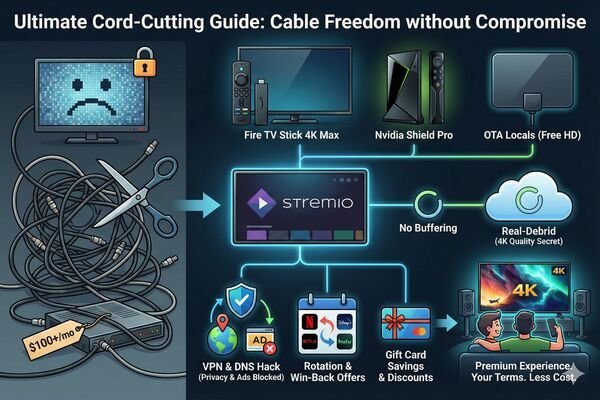
- Hardware: Buy a Fire TV Stick 4K Max, Nvidia Shield, or Chromecast.
- Signal: Get an OTA Antenna for local news.
- Software: Install Stremio + Real-Debrid for the ultimate experience.
- Network: Set a Custom DNS to block trackers.
- Protection: Use a VPN to stop throttling.
With these tools in hand, you are finally ready to enjoy a premium entertainment experience on your own terms, saving money without ever compromising on quality.
